Building TexWorker: A Stateless LaTeX Microservice
As I was building out the resume generation feature for my SaaS Resume Garden, I was extremely surprised to find out that it is actually really hard to find any good, cheap and easy to use LaTeX compilation public API. Thus started my quest to conquer the beast that is LaTeX, toss it in a container, and hope I my mental health survives along the way.
While LaTeX is undoubtedly the gold standard for high-quality document typesetting, it comes with a baggage of dependencies and caviats that make it kind of a pain to set up and use in a production environment.
LaTeX is very much a CPU-heavy system. I knew I didn’t want to pollute my main application server with it, nor did I want to deal with the security implications of running LaTeX commands directly on my host.
Enter TexWorker: a lightweight, containerized microservice that does one thing and does it well. Compiling LaTeX.
Why a Microservice?
The decision to isolate LaTeX compilation into its own repository and service was driven by three main goals:
- Isolation & Maintainability: By moving the LaTeX distribution into its own Docker container, I decoupled the heavy system requirements from the main application. This means the main app can stay lean and focused on business logic, while TexWorker handles the computational heavy lifting in parallel.
- Security (Sandboxing): Are you comfortable letting users run commands on your server? Me neither. Running it inside a locked-down Alpine container with an ephemeral filesystem provides a natural sandbox, protecting the rest of my infrastructure.
- Scalability: Document generation is CPU-intensive. By having a dedicated microservice, I can easily scale TexWorker horizontally if the load increases, without affecting the responsiveness of the main website.
The Stack: Simple and Effective
Just like the rest of Resume Garden, I wanted to keep the implementation of TexWorker as straightforward as possible:
- Python & FastAPI: For the API layer. It’s incredibly fast to develop and provides automatic documentation out of the box.
- Docker (Alpine-based): nothing fancy here – just a good old alpine image with the necessary dependencies installed.
- Latexmk: Instead of manually juggling multiple compilation passes, I use
latexmkwhich handles dependencies and is just a great facilitator for LaTeX in general.
How it Works
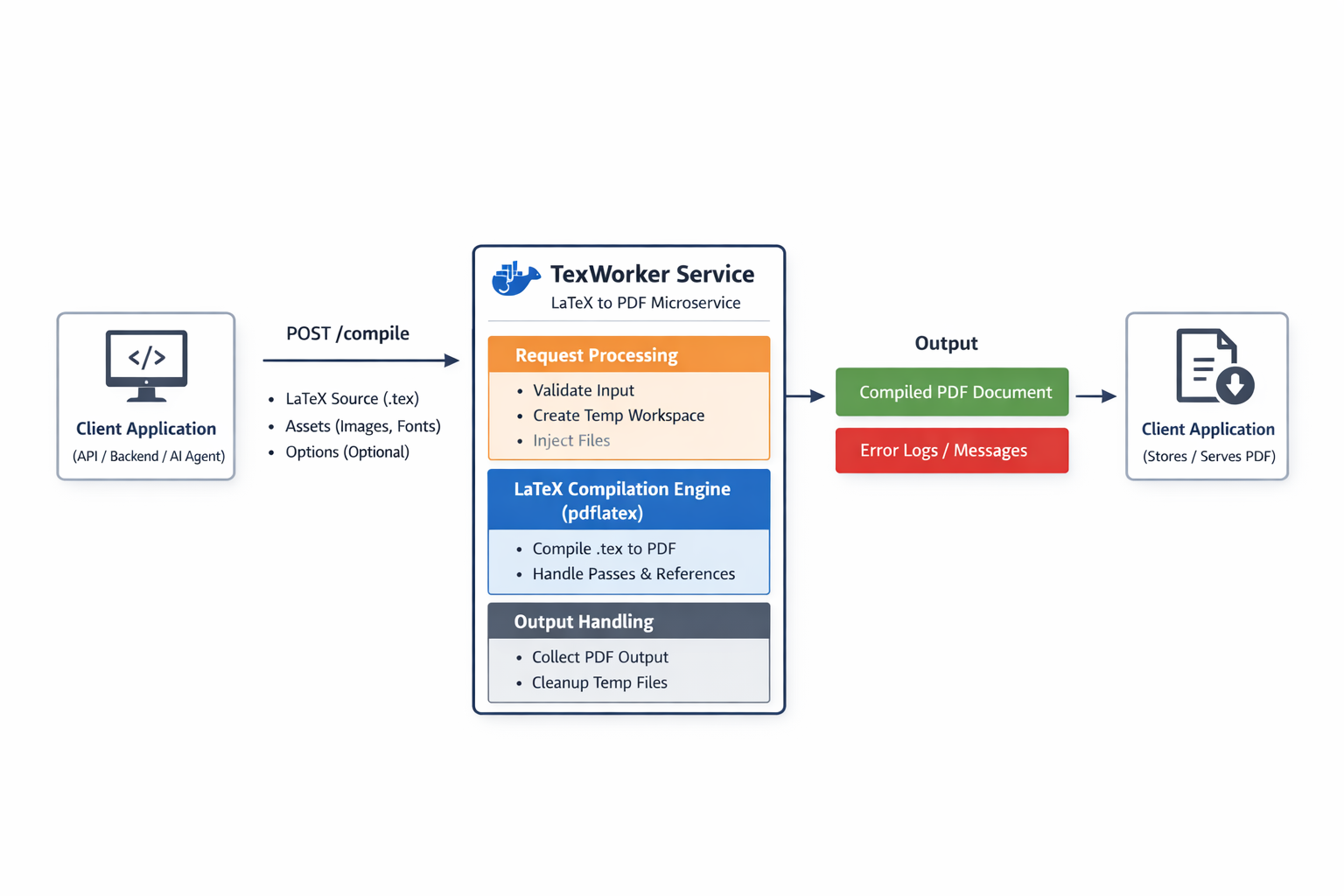
The workflow is completely stateless. When a compilation request hits the /compile endpoint:
- TexWorker creates a temporary working directory.
- It injects the provided LaTeX source (and any necessary assets).
- It runs the the LuaLaTeX engine to compile the document.
- It returns the resulting PDF as a base64 string (along with the logs).
- It wipes the directory, leaving no trace behind.
Final Thoughts
I had a blast with this one. It’s pretty rare to find a good usecase for microservices in smaller projects, but I think this is a good example of one. While there are still plenty of optimizations left for TexWorker before it goes live withResume Garden, I’m pretty happy with the result.
My next step is to trim the fat and reduce the docker image size as much as possible, optimize it for serverless environments and add necessary security features such as rate limiting, input validation, and resource controls.